 c00ede2978
The latest version of Android Studio fails with:

    Could not find com.android.tools.build:aapt2

To use AAPT2, we must now have a dependency on the `google()` repo
in both places in the root build.gradle file, as per:

    https://developer.android.com/studio/releases/#aapt2_gmaven
|
||
|---|---|---|
| .. | ||
| common/res/drawable | ||
| examples | ||
| gradle/wrapper | ||
| .gitignore | ||
| androidstudio01.jpg | ||
| androidstudio02.jpg | ||
| build.gradle | ||
| gradlew | ||
| gradlew.bat | ||
| README.md | ||
| settings.gradle | ||


 Vulkan examples on Android
Device support
- To run these examples you need a device with an Android image that suports Vulkan
- Builds currently only support arm-v7, other architectures may be added later
- Basic gamepad support is available too (zoom and rotate)
- Basic touch control support (zoom, move, rotate, look)
Building
Requirements
- Android Studio
- Android NDK (r11b or higher)
- Android SDK
Update the asset pack
During the Android build process, assets are copied over from the data folder, so it's important to make sure that a current version of the asset pack has been downloaded and extracted.
Building the Examples
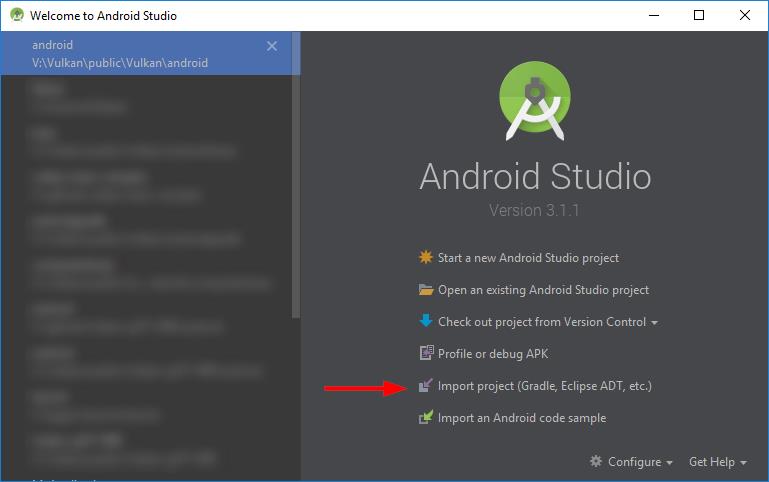
Select Import project from the welcome screen (or from inside Android via File->New):
Navigate to the android subfolder of this repository (should be higlighted with a gadle symbol):
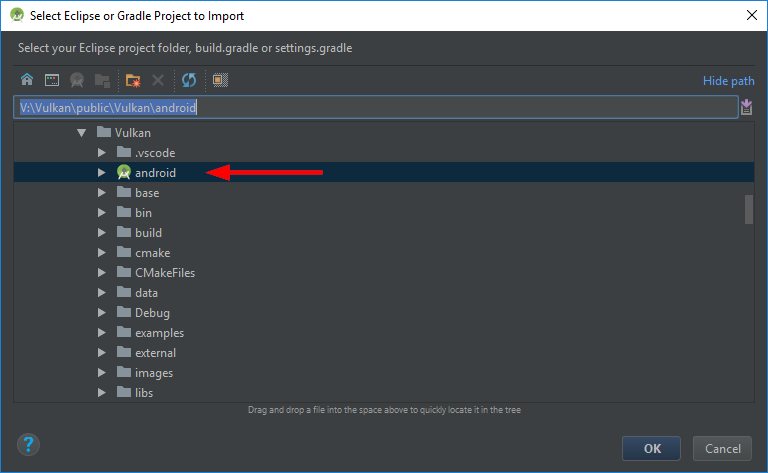
Select OK to start the import.
Note: Initial import will take a while due to the number of examples.
Once the import is done, the samples can be build, debugged and run from inside Android Studio just like any other Android project.
Note: If you update the repository at a later point you may have to resync to have additional examples added to the Android Studio project (File->Sync Project with Gradle files).