 feb939096f
* Added helper function for easy pipeline vertex input state create info structure setup from glTF model vertex class * Split glTF loader into header and implementation * Updated sample to use glTF * Removed collada files Replaced assets are now part of the asset pack * Return value for glTF model vertex input state create info helper * Removed unused assets * Use glTF assets * Added default material for glTF node's without materials * Use glTF assets * Apply pre-transforms to normals * Use glTF assets * Use glTF assets * Use vertex input state from glTF model class * Scene setup * Use glTF assets * Use glTF assets * Display error message and exit if glTF file could not be loaded * Use glTF assets * Use glTF assets * Use glTF assets * Remove unused buffer binds * Use glTF assets * Remove no longer used model files * Remove no longer used model files * Added support for rendering glTF models with images * glTF model normal pre-transform ignores translation * Use glTF assets * Use glTF assets * Use glTF assets * Use glTF assets * Use glTF assets * Only add combined image samplers to pool if actually used in the scene * Use global descriptor set layouts * Use global descriptor set layouts * Use glTF assets * Use glTF assets * Use glTF assets Code cleanup Updated GLSL and HLSL shaders * Use glTF assets Code cleanup * Use glTF assets Code cleanup Updated GLSL and HLSL shaders * Remove no-longer used model * Use glTF assets Code cleanup Updated GLSL and HLSL shaders * Use glTF assets Code cleanup Updated GLSL and HLSL shaders Removed no-longer used model * Use glTF assets Code cleanup Use RGBA texture instead of different compressed formats Removed no-longer used assets * Adnrdoid build file * Use glTF assets Code cleanup and refactoring Updated GLSL and HLSL shaders * Added vertex count and way of passing additional memory property type flags to glTF loader * Use glTF assets Updated GLSL and HLSL shaders Removed no-longer used assets * Use glTF assets Updated GLSL and HLSL shaders * Remove unfinished sample * Completely reworked push constants sample Use glTF assets Updated GLSL and HLSL shaders Removed no-longer used assets * Android CMake build files * Removed un-used asset * Explicit buffer binding function * Use glTF assets Code cleanup Updated GLSL and HLSL shaders * Use glTF assets Code cleanup * Use glTF assets Code cleanup Removed no-longer used assets * Use glTF assets Code cleanup Updated GLSL and HLSL shaders Removed no-longer used assets * Remove no-longer used asset * Use glTF assets Code cleanup and refactoring Performance optimizations Updated GLSL and HLSL shaders Removed no-longer used assets * Use glTF assets Code cleanup and refactoring Updated GLSL and HLSL shaders Removed no-longer used assets * Use glTF assets Code cleanup and refactoring Updated GLSL and HLSL shaders Removed no-longer used assets * Use glTF assets Code cleanup and refactoring Removed no-longer used assets * Use glTF assets Code cleanup and refactoring Removed no-longer used assets * Use glTF assets Code cleanup and refactoring * Use glTF assets Code cleanup and refactoring * Use glTF assets Code cleanup and refactoring Removed no-longer used assets * Pass vertex size and calculate multiplier in shaders instead of hard-coding With this, changes to the glTF vertex structure won't break the ray tracing samples * Load tangents (if present) * Use glTF assets Code cleanup and heavy refactoring Reworked debug display code * Android build * Normal mapping fixes Udpated HLSL shaders * Use glTF assets Code cleanup and heavy refactoring Reworked debug display code Updated GLSL and HLSL shaders * Code cleanup, comments * Use glTF assets Code cleanup and heavy refactoring Reworked debug display code Updated GLSL and HLSL shaders * Added sample count to framebuffer create info * Removed no-longer used assets * Android build Removed no-longer used assets * Code cleanup and heavy refactoring Updated GLSL and HLSL shaders Use tangents stored in GLSL instead of calculating them in the fragment shader * Renamed textured PBR sample main cpp file * Use glTF assets Code cleanup and refactoring Updated GLSL and HLSL shaders Removed no-longer used assets * Use glTF assets Removed no-longer used assets * Android build files * Android build files * Use glTF assets Removed no-longer used assets * Fixed HLSL shaders * Android build files * Use glTF assets Updated GLSL and HLSL shaders Removed no-longer used assets * Use glTF assets Updated GLSL and HLSL shaders Removed no-longer used assets * Added flag to disable glTF image loading Useful for samples that use their own textures or don't use textures at all to speed up loading * Use glTF assets Code cleanup Use Sponza scene instead of Sibenik to better highlight the effect Updated GLSL and HLSL shaders * Updated Android build files * Removed left-over comment * Use Sponza scene for the SSAO sample * Removed unused code * Removed ASSIMP No longer required as all samples now use the glTF file format * Added missing vertex shader stage * Removed old ASSIMP-based model loader * Added support for loading external glTF images from ktx Android fixes for loading external buffer files * Scene setup * Added missing shader stages * Removed ASSIMP from build files * Fixed compiler warning * Removed ASSIMP from readmes * Android build files cleanup * Replaced ktx submodule with only the files required for this repo The ktx submodule was a tad too big and contained lots of files not required for this repo * Moved ktx build files into base project * Use glTF assets * Use glTF assets * Removed license files, will be moved to asset pack * Use RGBA textures * Use RGBA cubemp texture with face assignment based on original images Refs #679 * Android build files * Removed textures All textures will be moved to the asset pack * Ignore asset folders * Removed font Fonts will be moved to the asset pack * Link to gltf asset pack * Updated gitignore * Android build file |
||
|---|---|---|
| .. | ||
| indirectdraw.cpp | ||
| README.md | ||
Indirect drawing
Synopsis
Issue multiple instanced draws for different meshes in one single draw call using indirect draw commands.
Requirements
If the multiDrawIndirect feature is supported, only one draw call is issued for the plants. If this feature is not available multiple indirect draw commands are used. Note: When issuing many draw counts also make sure to stay within the limitations of maxDrawIndirectCount.
Description
This example demonstrates the use of indirect draw commands. In addition to draw functions like vkCmdDraw and vkCmdDrawIndexed, where the parameters that specify what is drawn are passed directly to the function ("direct drawing"), there also exist indirect drawing commands.
vkCmdDrawIndirect and vkCmdDrawIndexedIndirect take the draw commands from a buffer object that contains descriptions on the draw commands to be issued, including instance and index counts, vertex offsets, etc. This also allows to draw multiple geometries with a single draw command as long as they're backed up by the same vertex (and index) buffer.
This adds several new possibilities of generating (and updating) actual draw commands, as that buffer can be generated and updated offline with no need to actually update the command buffers that contain the actual drawing functions.
Using indirect drawing you can generate the draw commands offline ahead of time on the CPU and even update them using shaders (as they're stored in a device local buffer). This adds lots of new possibilites to update draw commands without the CPU being involved, including GPU-based culling.
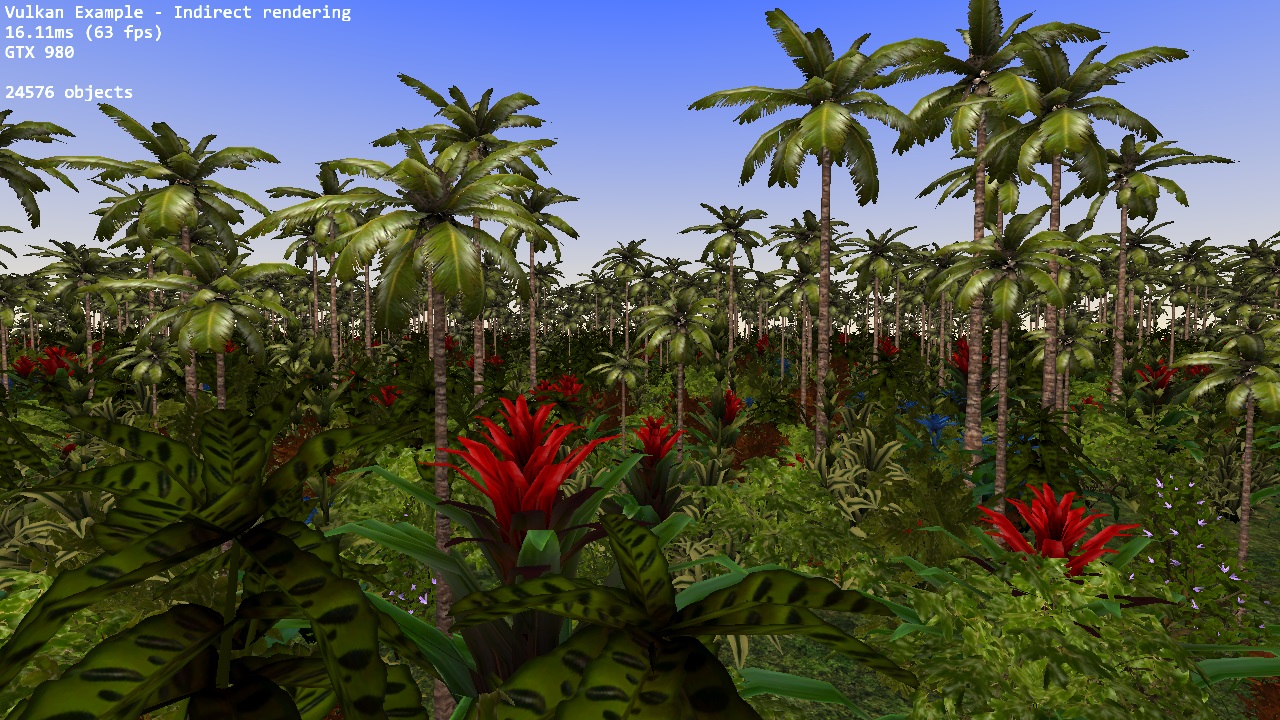
The example generates a single indirect buffer that contains draw commands for 12 different plants at random position, scale and rotation also using instancing to render the objects multiple times. The whole foliage (and trees) seen in the screen are drawn using only one draw call.
The different plant meshes are loaded from a single file and stored inside a single index and vertex buffer, index offsets are stored inside the indirect draw commands.
For details on the use of instancing (and instanced vertex attributes), see the instancing example
Points of interest
Preparing the indirect draw
The example generates the indirect drawing buffer right at the start. First step is to generate the data for the indirect draws. Vulkan has a dedicated struct for this called VkDrawIndexedIndirectCommand and the example uses a std::vector<VkDrawIndexedIndirectCommand> to store these before uploading them to the GPU:
void prepareIndirectData()
{
  ...
  uint32_t m = 0;
  for (auto& meshDescriptor : meshes.plants.meshDescriptors)
  {
    VkDrawIndexedIndirectCommand indirectCmd{};
    indirectCmd.instanceCount = OBJECT_INSTANCE_COUNT;
    indirectCmd.firstInstance = m * OBJECT_INSTANCE_COUNT;
    indirectCmd.firstIndex = meshDescriptor.indexBase;
    indirectCmd.indexCount = meshDescriptor.indexCount;
    indirectCommands.push_back(indirectCmd);
    m++;
  }
  ...
}
The meshDescriptor is generated by the mesh loader and contains the index base and count of that mesh inside the global index buffer containing all plant meshes for the scenery.
The indirect draw command for the second plant mesh looks like this:
indirectCmd.indexCount = 1668;
indirectCmd.instanceCount = 2048;
indirectCmd.firstIndex = 960;
indirectCmd.vertexOffset = 0;
indirectCmd.firstInstance = 2048;
Which will result in 2048 instances of the index data starting at index 960 (using 1668 indices) being drawn, the first instance is also important as the shader is using it for the instanced attributes of that object (position, rotation, scale).
Once we have filled that vector we need to create the buffer that the GPU uses to read the indirect commands from:
VK_CHECK_RESULT(vulkanDevice->createBuffer(
  VK_BUFFER_USAGE_INDIRECT_BUFFER_BIT | VK_BUFFER_USAGE_TRANSFER_DST_BIT,
  VK_MEMORY_PROPERTY_DEVICE_LOCAL_BIT,
  &indirectCommandsBuffer,
  stagingBuffer.size));

vulkanDevice->copyBuffer(&stagingBuffer, &indirectCommandsBuffer, queue);
To use a buffer for indirect draw commands you need to specify the VK_BUFFER_USAGE_INDIRECT_BUFFER_BIT usage flag at creation time. As the buffer is never again changed on the host side we stage it to the GPU to maximize performance.
Rendering
If the multiDrawIndirect is supported, we can issue all indirect draws with one single draw call:
void buildCommandBuffers()
{
  ...
  for (int32_t i = 0; i < drawCmdBuffers.size(); ++i)
  {
    vkCmdDrawIndexedIndirect(drawCmdBuffers[i], indirectCommandsBuffer.buffer, 0, indirectDrawCount, sizeof(VkDrawIndexedIndirectCommand));
  }
}
We just pass the buffer handle to the buffer containing the indirect draw commands and the number of drawCounts.
The non-indirect, non-instanced equivalent of this would be:
for (auto indirectCmd : indirectCommands)
  {
    for (uint32_t j = 0; j < indirectCmd.instanceCount; j++)
    {
      vkCmdDrawIndexed(drawCmdBuffers[i], indirectCmd.indexCount, 1, indirectCmd.firstIndex, 0, indirectCmd.firstInstance + j);
    }
  }
If the GPU does not support multiDrawIndirect we have to issue the indirect draw commands one-by-one using a buffer offset instead:
for (auto j = 0; j < indirectCommands.size(); j++)
{
  vkCmdDrawIndexedIndirect(drawCmdBuffers[i], indirectCommandsBuffer.buffer, j * sizeof(VkDrawIndexedIndirectCommand), 1, sizeof(VkDrawIndexedIndirectCommand));
}
Acknowledgements
- Plant and foliage models by Hugues Muller