 feb939096f
* Added helper function for easy pipeline vertex input state create info structure setup from glTF model vertex class * Split glTF loader into header and implementation * Updated sample to use glTF * Removed collada files Replaced assets are now part of the asset pack * Return value for glTF model vertex input state create info helper * Removed unused assets * Use glTF assets * Added default material for glTF node's without materials * Use glTF assets * Apply pre-transforms to normals * Use glTF assets * Use glTF assets * Use vertex input state from glTF model class * Scene setup * Use glTF assets * Use glTF assets * Display error message and exit if glTF file could not be loaded * Use glTF assets * Use glTF assets * Use glTF assets * Remove unused buffer binds * Use glTF assets * Remove no longer used model files * Remove no longer used model files * Added support for rendering glTF models with images * glTF model normal pre-transform ignores translation * Use glTF assets * Use glTF assets * Use glTF assets * Use glTF assets * Use glTF assets * Only add combined image samplers to pool if actually used in the scene * Use global descriptor set layouts * Use global descriptor set layouts * Use glTF assets * Use glTF assets * Use glTF assets Code cleanup Updated GLSL and HLSL shaders * Use glTF assets Code cleanup * Use glTF assets Code cleanup Updated GLSL and HLSL shaders * Remove no-longer used model * Use glTF assets Code cleanup Updated GLSL and HLSL shaders * Use glTF assets Code cleanup Updated GLSL and HLSL shaders Removed no-longer used model * Use glTF assets Code cleanup Use RGBA texture instead of different compressed formats Removed no-longer used assets * Adnrdoid build file * Use glTF assets Code cleanup and refactoring Updated GLSL and HLSL shaders * Added vertex count and way of passing additional memory property type flags to glTF loader * Use glTF assets Updated GLSL and HLSL shaders Removed no-longer used assets * Use glTF assets Updated GLSL and HLSL shaders * Remove unfinished sample * Completely reworked push constants sample Use glTF assets Updated GLSL and HLSL shaders Removed no-longer used assets * Android CMake build files * Removed un-used asset * Explicit buffer binding function * Use glTF assets Code cleanup Updated GLSL and HLSL shaders * Use glTF assets Code cleanup * Use glTF assets Code cleanup Removed no-longer used assets * Use glTF assets Code cleanup Updated GLSL and HLSL shaders Removed no-longer used assets * Remove no-longer used asset * Use glTF assets Code cleanup and refactoring Performance optimizations Updated GLSL and HLSL shaders Removed no-longer used assets * Use glTF assets Code cleanup and refactoring Updated GLSL and HLSL shaders Removed no-longer used assets * Use glTF assets Code cleanup and refactoring Updated GLSL and HLSL shaders Removed no-longer used assets * Use glTF assets Code cleanup and refactoring Removed no-longer used assets * Use glTF assets Code cleanup and refactoring Removed no-longer used assets * Use glTF assets Code cleanup and refactoring * Use glTF assets Code cleanup and refactoring * Use glTF assets Code cleanup and refactoring Removed no-longer used assets * Pass vertex size and calculate multiplier in shaders instead of hard-coding With this, changes to the glTF vertex structure won't break the ray tracing samples * Load tangents (if present) * Use glTF assets Code cleanup and heavy refactoring Reworked debug display code * Android build * Normal mapping fixes Udpated HLSL shaders * Use glTF assets Code cleanup and heavy refactoring Reworked debug display code Updated GLSL and HLSL shaders * Code cleanup, comments * Use glTF assets Code cleanup and heavy refactoring Reworked debug display code Updated GLSL and HLSL shaders * Added sample count to framebuffer create info * Removed no-longer used assets * Android build Removed no-longer used assets * Code cleanup and heavy refactoring Updated GLSL and HLSL shaders Use tangents stored in GLSL instead of calculating them in the fragment shader * Renamed textured PBR sample main cpp file * Use glTF assets Code cleanup and refactoring Updated GLSL and HLSL shaders Removed no-longer used assets * Use glTF assets Removed no-longer used assets * Android build files * Android build files * Use glTF assets Removed no-longer used assets * Fixed HLSL shaders * Android build files * Use glTF assets Updated GLSL and HLSL shaders Removed no-longer used assets * Use glTF assets Updated GLSL and HLSL shaders Removed no-longer used assets * Added flag to disable glTF image loading Useful for samples that use their own textures or don't use textures at all to speed up loading * Use glTF assets Code cleanup Use Sponza scene instead of Sibenik to better highlight the effect Updated GLSL and HLSL shaders * Updated Android build files * Removed left-over comment * Use Sponza scene for the SSAO sample * Removed unused code * Removed ASSIMP No longer required as all samples now use the glTF file format * Added missing vertex shader stage * Removed old ASSIMP-based model loader * Added support for loading external glTF images from ktx Android fixes for loading external buffer files * Scene setup * Added missing shader stages * Removed ASSIMP from build files * Fixed compiler warning * Removed ASSIMP from readmes * Android build files cleanup * Replaced ktx submodule with only the files required for this repo The ktx submodule was a tad too big and contained lots of files not required for this repo * Moved ktx build files into base project * Use glTF assets * Use glTF assets * Removed license files, will be moved to asset pack * Use RGBA textures * Use RGBA cubemp texture with face assignment based on original images Refs #679 * Android build files * Removed textures All textures will be moved to the asset pack * Ignore asset folders * Removed font Fonts will be moved to the asset pack * Link to gltf asset pack * Updated gitignore * Android build file |
||
|---|---|---|
| .. | ||
| gltfscenerendering.cpp | ||
| gltfscenerendering.h | ||
| README.md | ||
glTF scene rendering
Synopsis
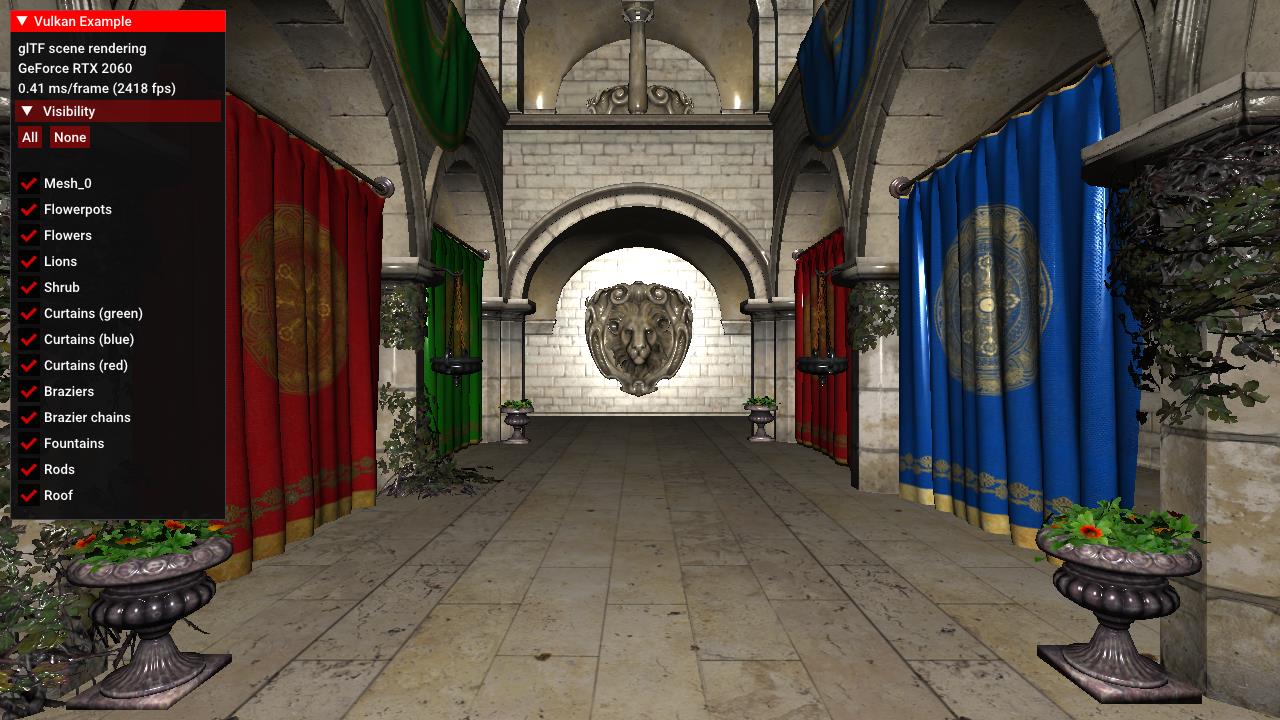
Render a complete scene loaded from an glTF file. The sample is based on the glTF scene sample, and adds data structures, functions and shaders required to render a more complex scene using Crytek's Sponza model.
Description
This example demonstrates how to render a more complex scene loaded from a glTF model.
It builds on the basic glTF scene sample but instead of using global pipelines, it adds per-material pipelines that are dynamically created from the material definitions of the glTF model.
Those pipelines pass per-material parameters to the shader so different materials for e.g. displaying opaque and transparent objects can be built from a single shader.
It also adds data structures, loading functions and shaders to do normal mapping and an easy way of toggling visibility for the scene nodes.
Note that this is not a full glTF implementation as this would be beyond the scope of a simple example. For a complete glTF Vulkan implementation see my Vulkan glTF PBR renderer.
For details on glTF refer to the official glTF 2.0 specification.
Points of interest
Note: Points of interest are marked with a POI in the code comments:
// POI: This sample uses normal mapping, so we also need to load the tangents from the glTF file
For this sample, those points of interest mark additions and changes compared to the basic glTF sample.
Loading external images
Unlike the other samples, the glTF scene used for this example doesn't embed the images but uses external ktx images instead. This makes loading a lot faster as the ktx image format natively maps to the GPU and no longer requires us to convert RGB to RGBA, but ktx also allows us to store the mip-chain in the image file itself.
So instead of creating the textures from a buffer that has been converted from the embedded RGB images, we just load the ktx files from disk:
void VulkanglTFScene::loadImages(tinygltf::Model& input)
{
	images.resize(input.images.size());
	for (size_t i = 0; i < input.images.size(); i++) {
		tinygltf::Image& glTFImage = input.images[i];
		images[i].texture.loadFromFile(path + "/" + glTFImage.uri, VK_FORMAT_R8G8B8A8_UNORM, vulkanDevice, copyQueue);
	}
}
Materials
New Material poperties
struct Material
{
	glm::vec4 baseColorFactor = glm::vec4(1.0f);
	uint32_t baseColorTextureIndex;
	uint32_t normalTextureIndex;
	std::string alphaMode = "OPAQUE";
	float alphaCutOff;
	bool doubleSided = false;
	VkDescriptorSet descriptorSet;
	VkPipeline pipeline;
};
Several new properties have been added to the material class for this example that are taken from the glTF source.
Along with the base color we now also get the index of the normal map for that material in normalTextureIndex, and store several material properties required to render the different materials in this scene:
alphaMode
The alpha mode defines how the alpha value for this material is determined. For opaque materials it's ignored, for masked materials the shader will discard fragments based on the alpha cutoff.alphaCutOff
For masked materials, this value specifies the threshold between fully opaque and fully transparent. This is used to discard fragments in the fragment shader.doubleSided
This property is used to select the appropriate culling mode for this material. For double-sided materials, culling will be disabled.
Retrieving these additional values is done here:
void VulkanglTFScene::loadMaterials(tinygltf::Model& input)
{
	materials.resize(input.materials.size());
	for (size_t i = 0; i < input.materials.size(); i++) {
		tinygltf::Material glTFMaterial = input.materials[i];
		...
		materials[i].alphaMode = glTFMaterial.alphaMode;
		materials[i].alphaCutOff = (float)glTFMaterial.alphaCutoff;
		materials[i].doubleSided = glTFMaterial.doubleSided;
	}
}
Note: We only read the glTF material properties we use in this sample. There are many more, details on those can be found here.
Per-Material pipelines
Unlike most of the other samples that use a few pre-defined pipelines, this sample will dynamically generate per-material pipelines based on material properties in the VulkanExample::preparePipelines() function
We first setup pipeline state that's common for all materials:
// Setup common pipeline state properties...
VkPipelineInputAssemblyStateCreateInfo inputAssemblyStateCI = ...
VkPipelineRasterizationStateCreateInfo rasterizationStateCI = ...
VkPipelineColorBlendAttachmentState blendAttachmentStateCI = ...
...

for (auto &material : glTFScene.materials)
{
	...
For each material we then set constant properties for the fragment shader using specialization constants:
	struct MaterialSpecializationData {
		bool alphaMask;
		float alphaMaskCutoff;
	} materialSpecializationData;

	materialSpecializationData.alphaMask = material.alphaMode == "MASK";
	materialSpecializationData.alphaMaskCutoff = material.alphaCutOff;

	std::vector<VkSpecializationMapEntry> specializationMapEntries = {
		vks::initializers::specializationMapEntry(0, offsetof(MaterialSpecializationData, alphaMask), sizeof(MaterialSpecializationData::alphaMask)),
		vks::initializers::specializationMapEntry(1, offsetof(MaterialSpecializationData, alphaMaskCutoff), sizeof(MaterialSpecializationData::alphaMaskCutoff)),
	};
	VkSpecializationInfo specializationInfo = vks::initializers::specializationInfo(specializationMapEntries, sizeof(materialSpecializationData), &materialSpecializationData);
	shaderStages[1].pSpecializationInfo = &specializationInfo;
	...
We also set the culling mode depending on whether this material is double-sided:
	// For double sided materials, culling will be disabled
	rasterizationStateCI.cullMode = material.doubleSided ? VK_CULL_MODE_NONE : VK_CULL_MODE_BACK_BIT;
With those setup we create a pipeline for the current material and store it as a property of the material class:
	VK_CHECK_RESULT(vkCreateGraphicsPipelines(device, pipelineCache, 1, &pipelineCI, nullptr, &material.pipeline));
}
The material now also get's it's own pipeline.
The alpha mask properties are used in the fragment shader to distinguish between opaque and transparent materials (scene.frag).
Specialization constant declaration in the shaders's header:
layout (constant_id = 0) const bool ALPHA_MASK = false;
layout (constant_id = 1) const float ALPHA_MASK_CUTOFF = 0.0;
Note: The default values provided in the shader are overwritten by the values passed at pipeline creation time.
For alpha masked materials, fragments below the cutoff threshold are discarded:
	vec4 color = texture(samplerColorMap, inUV) * vec4(inColor, 1.0);

	if (ALPHA_MASK) {
		if (color.a < ALPHA_MASK_CUTOFF) {
			discard;
		}
	}
Normal mapping
This sample also adds tangent space normal mapping to the rendering equation to add additional detail to the scene, which requires loading additional data.
Normal maps
Along with the color maps, we now also load all normal maps. From the glTF POV those are just images like all other texture maps, and are stored in the image vector. So as for loading normal maps no code changes are required. The normal map images are then referenced by the index of the normal map of the material, which is now read in addition to the other material properties:
void VulkanglTFScene::loadMaterials(tinygltf::Model& input)
{
	materials.resize(input.materials.size());
	for (size_t i = 0; i < input.materials.size(); i++) {
		tinygltf::Material glTFMaterial = input.materials[i];
		...
		// Get the normal map texture index
		if (glTFMaterial.additionalValues.find("normalTexture") != glTFMaterial.additionalValues.end()) {
			materials[i].normalTextureIndex = glTFMaterial.additionalValues["normalTexture"].TextureIndex();
		}
		...
	}
}
*Note: Unlike the color map index, the normal map index is stored in the additionalValues of the material.
The normal maps are then bound to binding 1 via the material's descriptor set in VulkanExample::setupDescriptors:
for (auto& material : glTFScene.materials) {
	...
	VkDescriptorImageInfo colorMap = glTFScene.getTextureDescriptor(material.baseColorTextureIndex);
	VkDescriptorImageInfo normalMap = glTFScene.getTextureDescriptor(material.normalTextureIndex);
	std::vector<VkWriteDescriptorSet> writeDescriptorSets = {
		vks::initializers::writeDescriptorSet(material.descriptorSet, VK_DESCRIPTOR_TYPE_COMBINED_IMAGE_SAMPLER, 0, &colorMap),
		vks::initializers::writeDescriptorSet(material.descriptorSet, VK_DESCRIPTOR_TYPE_COMBINED_IMAGE_SAMPLER, 1, &normalMap),
	};
	vkUpdateDescriptorSets(device, static_cast<uint32_t>(writeDescriptorSets.size()), writeDescriptorSets.data(), 0, nullptr);
}
The descriptor set itself is then bound to set 1 at draw time in VulkanglTFScene::drawNode:
if (node.mesh.primitives.size() > 0) {
	...
	for (VulkanglTFScene::Primitive& primitive : node.mesh.primitives) {
		if (primitive.indexCount > 0) {
			VulkanglTFScene::Material& material = materials[primitive.materialIndex];
			...
			vkCmdBindDescriptorSets(commandBuffer, VK_PIPELINE_BIND_POINT_GRAPHICS, pipelineLayout, 1, 1, &material.descriptorSet, 0, nullptr);
			...
		}
	}
}
Fragment shader interface in scene.frag:
layout (set = 1, binding = 0) uniform sampler2D samplerColorMap;
layout (set = 1, binding = 1) uniform sampler2D samplerNormalMap;
Per-Vertex tangents
Along with the normals we also need per-vertex tangents and bitangents for normal mapping. As the bitangent can easily be calculated using the normal and tangent, glTF only stores those two.
So just like with other vertex data already loaded we need to check if there are tangents for a node and load them from the appropriate buffer using a glTF accessor:
void VulkanglTFScene::loadNode(const tinygltf::Node& inputNode, const tinygltf::Model& input, VulkanglTFScene::Node* parent, std::vector<uint32_t>& indexBuffer, std::vector<VulkanglTFScene::Vertex>& vertexBuffer)
{
	VulkanglTFScene::Node node{};
	...

	if (inputNode.mesh > -1) {
		const tinygltf::Mesh mesh = input.meshes[inputNode.mesh];
		for (size_t i = 0; i < mesh.primitives.size(); i++) {
			const tinygltf::Primitive& glTFPrimitive = mesh.primitives[i];
			// Vertices
			{
				...
				const float* tangentsBuffer = nullptr;

				if (glTFPrimitive.attributes.find("TANGENT") != glTFPrimitive.attributes.end()) {
					const tinygltf::Accessor& accessor = input.accessors[glTFPrimitive.attributes.find("TANGENT")->second];
					const tinygltf::BufferView& view = input.bufferViews[accessor.bufferView];
					tangentsBuffer = reinterpret_cast<const float*>(&(input.buffers[view.buffer].data[accessor.byteOffset + view.byteOffset]));
				}

				for (size_t v = 0; v < vertexCount; v++) {
					Vertex vert{};
					...
					vert.tangent = tangentsBuffer ? glm::make_vec4(&tangentsBuffer[v * 4]) : glm::vec4(0.0f);
 					vertexBuffer.push_back(vert);
				}
			}
			...
Note: The tangent is a four-component vector, with the w-component storing the handedness of the tangent basis. This will be used later on in the shader.
Shaders
Normal mapping is applied in the scene.frag fragment shader and boils down to calculating a new world-space normal from the already provided per-vertex normal and the per-fragment tangent space normals provided via the materials' normal map.
With the per-vertex normal and tangent values passed to the fragment shader, we simply change the way the per-fragment normal is calculated:
vec3 normal      = normalize(inNormal);
vec3 tangent     = normalize(inTangent.xyz);
vec3 bitangent   = cross(inNormal, inTangent.xyz) * inTangent.w;
mat3 TBN         = mat3(tangent, bitangent, normal);
vec3 localNormal = texture(samplerNormalMap, inUV).xyz * 2.0 - 1.0;
normal           = normalize(TBN * localNormal);
As noted earlier, glTF does not store bitangents, but we can easily calculate them using the cross product of the normal and tangent. We also multiply this with the tangent's w-component which stores the handedness of the tangent. This is important, as this may differ between nodes in a glTF file.
After that we calculate the tangent to world-space transformation matrix that is then applied to the per-fragment normal read from the normal map.
This is then our new normal that is used for the lighting calculations to follow.
Rendering the scene
Just like in the basic glTF sample, the scene hierarchy is added to the command buffer in VulkanglTFModel::draw. Since glTF has a hierarchical node structure this function recursively calls VulkanglTFModel::drawNode for rendering a give node with it's children.
The only real change in this sample is binding the per-material pipeline for a node's mesh:
void VulkanglTFScene::drawNode(VkCommandBuffer commandBuffer, VkPipelineLayout pipelineLayout, VulkanglTFScene::Node node)
{
	if (!node.visible) {
		return;
	}
	if (node.mesh.primitives.size() > 0) {
		...
		vkCmdPushConstants(commandBuffer, pipelineLayout, VK_SHADER_STAGE_VERTEX_BIT, 0, sizeof(glm::mat4), &nodeMatrix);
		for (VulkanglTFScene::Primitive& primitive : node.mesh.primitives) {
			if (primitive.indexCount > 0) {
				VulkanglTFScene::Material& material = materials[primitive.materialIndex];
				vkCmdBindPipeline(commandBuffer, VK_PIPELINE_BIND_POINT_GRAPHICS, material.pipeline);
				vkCmdBindDescriptorSets(commandBuffer, VK_PIPELINE_BIND_POINT_GRAPHICS, pipelineLayout, 1, 1, &material.descriptorSet, 0, nullptr);
				vkCmdDrawIndexed(commandBuffer, primitive.indexCount, 1, primitive.firstIndex, 0, 0);
			}
		}
	}
	for (auto& child : node.children) {
		drawNode(commandBuffer, pipelineLayout, child);
	}
}